
Capture
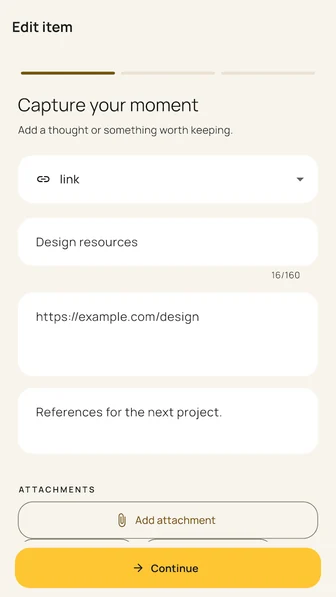
Capture the thought.
Save a note, a link or a file while the idea is fresh.
For example
A project idea with its reference link.

Tuckivo
Available on Google Play
Save notes, links and files in one library. Give them a collection, find them with search, and add a reminder when you need to follow up.
For Android · Arabic and English
The Android app requires an account. Optional AI analysis needs your consent and an internet connection. We send the content you choose to our service for processing.
Capture
Save a note, a link or a file while the idea is fresh.
A project idea with its reference link.
Organize
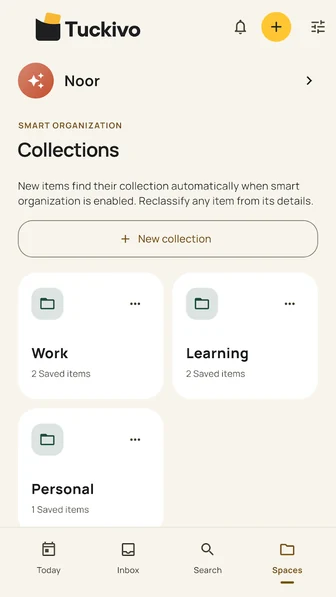
Keep related content in collections you recognize.
A collection for work or learning.
Follow up
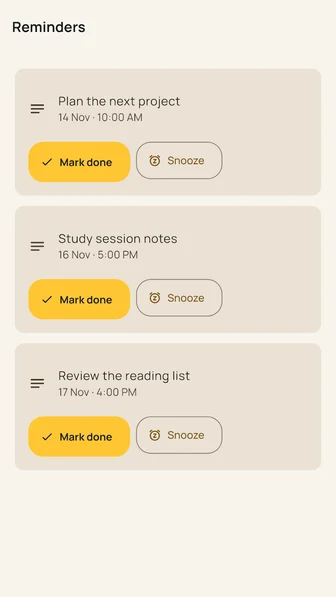
Keep a due date with the content and choose what to follow up on.
A task to revisit tomorrow.
Tuckivo
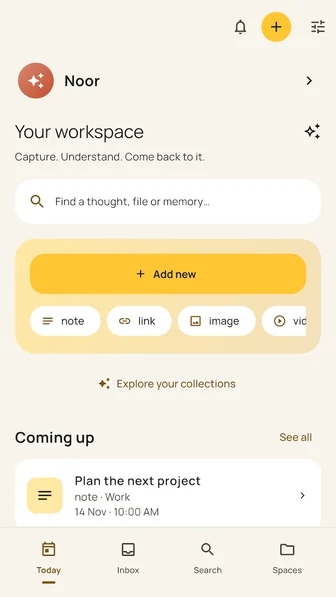
Choose a feature, read its details and try it in the browser.
Keep a note, a link or the start of an idea while it is still fresh.
A local demo in this browser. Open Tuckivo to manage your library on your phone.
Add a title and content.
Keep a note, a link or the start of an idea while it is still fresh.
Choose its type and collection.
Give a saved idea a next action.
Give related notes and references a place of their own.
A local demo in this browser. Open Tuckivo to manage your library on your phone.
Name a new collection.
Give related notes and references a place of their own.
Choose a saved item.
See related content in one view.
Return to what you saved using the words and details you remember.
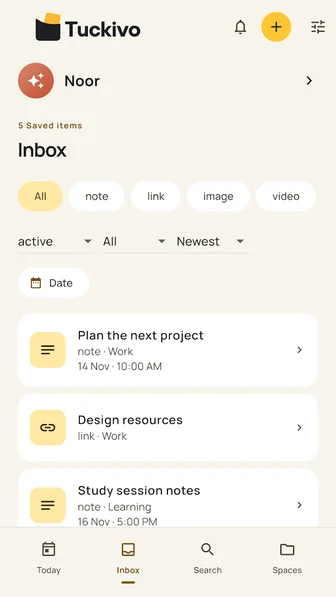
A local demo in this browser. Open Tuckivo to manage your library on your phone.
Type a word you remember.
Return to what you saved using the words and details you remember.
Choose a type or collection.
Combine filters to narrow your results.
Keep a next action and its date beside the related content.
A local demo in this browser. Open Tuckivo to manage your library on your phone.
Choose an item.
Keep a next action and its date beside the related content.
Set its date and recurrence.
Explore recurrence after completing an item.
Bring the files behind your ideas into the same library as your notes.
A local demo in this browser. Open Tuckivo to manage your library on your phone.
Choose a file from your device.
Bring the files behind your ideas into the same library as your notes.
Review its name, type and size.
Keep a file reference in the demo library.
Preview a code’s content or turn short text into a QR code.
A local demo in this browser. Open Tuckivo to manage your library on your phone.
Enter a link or short text.
Preview a code’s content or turn short text into a QR code.
Generate the code.
Keep the code’s content in your library.
Explore how optional analysis can suggest a summary, collection and tags.
A local demo in this browser. Open Tuckivo to manage your library on your phone.
Prepare the first project proposal and gather references before the team meeting.
Prepare the project proposal and its references for the meeting.
A delivery notice confirms Thursday’s delivery. Keep the order number for follow-up.
Follow up on the delivery and keep its order number.
Review extracted text and edit it before keeping it as a note.
A local demo in this browser. Open Tuckivo to manage your library on your phone.
Prepared receipt excerpt
Review extracted text and edit it before keeping it as a note.
Prepared meeting notice
Keep the text in a collection.
Keep your active library focused and revisit items when you need them.
A local demo in this browser. Open Tuckivo to manage your library on your phone.
Choose an item.
Keep your active library focused and revisit items when you need them.
Try a status action.
Restore an item or delete it from the demo.
Apply the same action to several saved items in one step.
A local demo in this browser. Open Tuckivo to manage your library on your phone.
Select items with checkboxes.
Apply the same action to several saved items in one step.
Choose the action.
Review the updated statuses.
Export and restore the example library from this browser.
A local demo in this browser. Open Tuckivo to manage your library on your phone.
Download the demo backup.
Export and restore the example library from this browser.
Choose a backup from this page.
Merge its items and collections.
Explore a two-device example before choosing which revision to keep.
A local demo in this browser. Open Tuckivo to manage your library on your phone.
Read the two example versions.
Explore a two-device example before choosing which revision to keep.
Choose the version you prefer.
Choose a version for the local demo.
Explore private notification previews and the appearance of a locked screen.
A local demo in this browser. Open Tuckivo to manage your library on your phone.
Change the preview setting.
Explore private notification previews and the appearance of a locked screen.
Lock the example card.
Learn about the app’s lock and preview settings.
Make the library feel like your space with a name and avatar.
A local demo in this browser. Open Tuckivo to manage your library on your phone.
Enter a sample name.
Make the library feel like your space with a name and avatar.
Choose an avatar.
See the profile update in the preview.
Choose the interface language and appearance that suit you.
A local demo in this browser. Open Tuckivo to manage your library on your phone.
Choose a language.
Choose the interface language and appearance that suit you.
Try the appearance controls.
Keep the selected feature across languages.
Explore a compact view of something you want to keep close.
A local demo in this browser. Open Tuckivo to manage your library on your phone.
Choose a library item.
Explore a compact view of something you want to keep close.
Choose a widget size.
Open the item from its example widget.
Use the Android app to keep notes, links and files together. Put related items in a collection such as work, learning or personal, then use search to find what you need.
Add a follow-up time to the library item. The website demo lets you try setting and updating that date. For device notifications, set the reminder in the app and check your Android notification settings.
The demo keeps library items in this browser. It also lets you export or import an example backup. Your Tuckivo account and native app library are managed in the app.
The website shows prepared examples so you can see how information is organized. Optional AI analysis in the app needs consent and an internet connection to process the content you select.
Yes. Tuckivo is available as a free download from Google Play. See the listing and the app for current options.
Take your ideas and follow-ups with you on Android.